Reageer op dit bericht
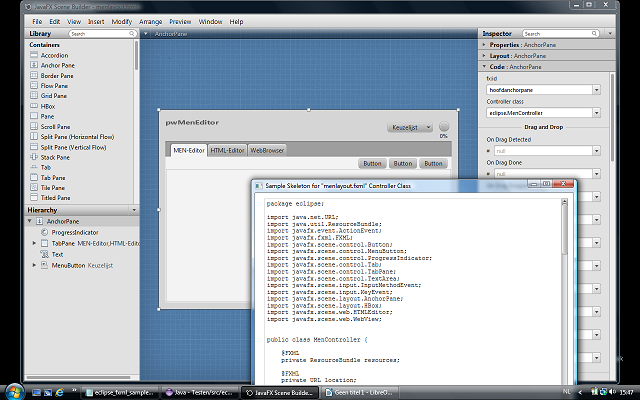
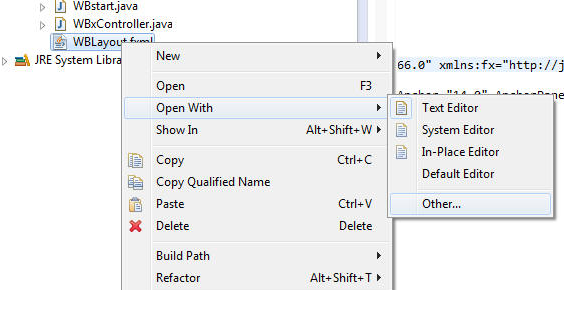
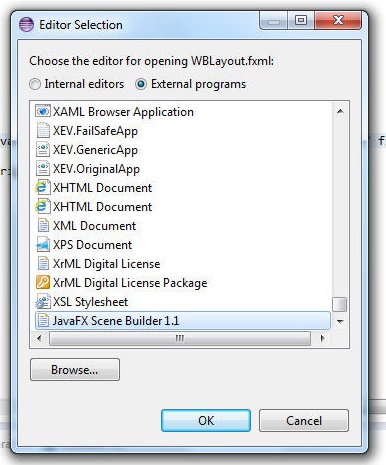
Draai scene builder vanuit eclipse - Run scene builder from within eclipse.


FXML voorbeeld voor eclipse | FXML sample for eclipse


Wapenschild Hamerlinck


Wapenschild Hamerlinck

Zelf oefeningen maken :: educatie , talen , enquetes
Zelf invuloefeningen of multiple choice oefenningen maken op een eenvoudige manier.
Structuur en voorbeeldvideo
Link naar de oefening - formmaker
Kan gebruikt worden voor talen , quizvragen , algemene kennis.
ST. PATRICKS DAY PARADE
ST. PATRICKS DAY PARADE 2009
Free speech is sacred
Hulp programma voor het leren van vreemde talen.
Een handig hulpmiddel om dit doel te bereiken wordt geboden door het volgende html-javascript gereedschap.
Klik hier voor een voorbeeld van voorgeprogrammeerde oefeningen: Voorgeprogrameerde oefeningen
Code:
<!DOCTYPE HTML PUBLIC "-//W3C//DTD HTML 3.2//EN">
<HTML>
<HEAD>
<META HTTP-EQUIV="CONTENT-TYPE" CONTENT="text/html; charset=windows-1252">
<TITLE></TITLE>
<META NAME="GENERATOR" CONTENT="OpenOffice.org 3.0 (Win32)">
<META NAME="AUTHOR" CONTENT="piet willems">
<META NAME="CREATED" CONTENT="17-02-2009">
<META NAME="CHANGED" CONTENT="0;0">
<style>
.mini{font-family:Tahoma; font-size:7pt;text-spacing:-1px;line-height:90%}
.display{font-size:26 ;font-family:Arial; font-weight : bold;text-align: center}
</style>
<script language=javascript>
var randomnr;
var timerboolean = false;
var teller = null;
var x=0,t=1;
var ingave;
var woordenschat;
var tijd,t;
var max;
var aantalzinnen=0;
function Initieergeordend(oef)
{
ingave = document.getElementById('bron').value;
woordenschat =document.getElementById('bron').value;
woordenschat=woordenschat.split(".");
tijd = document.getElementById('leesduur').value;
max= woordenschat.length;
document.getElementById('aantalzinnentekst').value = max;
aantalzinnen = document.getElementById('duuroefening').value; //100
if(timerboolean)
{
clearTimeout(teller);
timerboolean = false;
}
if (aantalzinnen==0)
{
StopTheClock();
alert("Einde van de oefening.");
}
else
{
aantalzinnen = aantalzinnen - 1;
timerboolean = true;
document.getElementById('displaycell').innerHTML=woordenschat[x];
t = woordenschat[x].length;
x=x+1;
document.getElementById('duuroefening').value=aantalzinnen;
tijd = tijd*t;
document.getElementById('berekendeleestijd').value=tijd;
teller = self.setTimeout("Initieergeordend()", tijd);
}
}
function Initieerwillekeurig()
{
ingave = document.getElementById('bron').value;
woordenschat =document.getElementById('bron').value;
woordenschat=woordenschat.split(".");
tijd = document.getElementById('leesduur').value;
max= woordenschat.length;
document.getElementById('aantalzinnentekst').value = max;
aantalzinnen = document.getElementById('duuroefening').value; //100
if(timerboolean)
{
clearTimeout(teller);
timerboolean = false;
}
if (aantalzinnen==0)
{
StopTheClock();
alert("Einde van de oefening.");
}
else
{
aantalzinnen = aantalzinnen - 1;
timerboolean = true;
randomnr = Math.random();
document.getElementById('displaycell').innerHTML=woordenschat[Math.ceil(randomnr*max)-1];
t = woordenschat[Math.ceil(randomnr*max)-1].length;
document.getElementById('duuroefening').value=aantalzinnen;
tijd = tijd*t;
document.getElementById('berekendeleestijd').value=tijd;
teller = self.setTimeout("Initieerwillekeurig()", tijd);
}
}
function StopTheClock()
{
if(timerboolean)
{
clearTimeout(teller);
timerboolean = false;
}
location.reload(true);
//alert("Einde van de oefening.")
}
function LaadOef1()
{
document.getElementById('bron').value=document.getElementById('oef1').value;
}
function LaadOef2()
{
document.getElementById('bron').value=document.getElementById('oef2').value;
}
function LaadOef3()
{
document.getElementById('bron').value=document.getElementById('oef3').value;
}
function LaadOef4()
{
document.getElementById('bron').value=document.getElementById('oef4').value;
}
function LaadOef5()
{
document.getElementById('bron').value=document.getElementById('oef5').value;
}
function LaadOef6()
{
document.getElementById('bron').value=document.getElementById('oef6').value;
}
function laadinstructies()
{
document.getElementById('bron').value="Plak hier uw tekst of gebruik één van onderstaande knoppen die een voorbeeldtekst laden.\rNieuwe tekst laden:\rdruk Stop | druk Reset | plak nieuwe tekst | Start geordend/willekeurig";
}
</script>
</head>
<body onload=laadinstructies()>
<table border="0" width="100%">
<tr>
<td bgcolor="#3C0000" style="border: 1px solid #000000; ">
<b>
<font face="Arial" color="#FFFFFF">Oefen- en Hulpgereedschap : Leren lezen in
een vreemde taal. Leer uw woordenschat : Leer gezegden en uitdrukkingen.</font></b></td>
</tr>
<tr>
<td id="displaycell" class="display" height="151" style="border: 1px solid #C0C0C0">
</td>
</tr>
<tr>
<td></td>
</tr>
</table>
<table border="0" width="100%" style="border: 1px solid #6C3600" bgcolor="#FF8C1A">
<tr>
<td width="81" valign="bottom">
<input type="button" value="Start geordend" name="B4" onclick=Initieergeordend()></td>
<td width="81" valign="bottom">
<input type="button" value="Start willekeurig" name="B7" onclick=Initieerwillekeurig()></td>
<td width="56" valign="bottom">
<input type="button" value="Stop" name="B5" onclick=(StopTheClock())></td>
<td width="166" valign="bottom">
<b>
<font face="Arial" size="1">Aantal keer oefenen </font>
</b>
<input id="duuroefening" value="10" size="6" name="duuroefening"></td>
<td width="117" valign="bottom">
<p align="left"><b><font face="Arial" size="1">Leestijd </font>
</b>
<input id="leesduur" value="70" size="6" name="leesduur"></td>
<td valign="bottom" width="132"><font size="1" face="Arial">Aantal
zinnen in de tekst</font></td>
<td valign="bottom" width="63">
<!--webbot bot="Validation" s-data-type="Number" s-number-separators="x," --><input id="aantalzinnentekst" value="0" size="6" name="randomkeuze" style="border: 1px solid #800000"></td>
<td valign="bottom" width="115">
<p align="right"><font size="1" face="Arial">Berekende leestijd :</font></td>
<td valign="bottom">
<!--webbot bot="Validation" s-data-type="Number" s-number-separators="x," --><input id="berekendeleestijd" size="6" name="randomkeuze0" style="border: 1px solid #800000"></td>
</tr>
</table>
<table border="0" width="100%" cellspacing="5" style="border-left-style: solid; border-left-width: 1px; border-right-style: solid; border-right-width: 1px; border-top-width: 1px; border-bottom-style: solid; border-bottom-width: 1px">
<tr>
<td>
<input type="button" value="Moeilijke woorden" name="B12" onclick=LaadOef1()></td>
<td>
<input type="button" value="Spreekwoorden A" name="B13" onclick=LaadOef2()></td>
<td>
<input type="button" value="Leesoef. 1" name="B14" onclick=LaadOef3()></td>
<td>
<input type="button" value="Leesoef.2" name="B15" onclick=LaadOef4()></td>
<td>
<input type="button" value="Leesoef.3" name="B16" onclick=LaadOef5()></td>
<td>
<input type="button" value="Leesoef.4" name="B17" onclick=LaadOef6()></td>
</table>
<p> </p>
<p align="center"><font face="Arial">
<textarea rows="10" name="S7" cols="91" id="bron" style="border: 1px solid #510000; ">
</textarea></font></p>
<p> </p>
<p> </p>
<p> </p>
<p> </p>
<p> </p>
<form method="POST">
<TABLE height="255" width="100%" cellspacing="0" >
<TR>
<TD HEIGHT=19 ALIGN=LEFT bgcolor="#3C0000"><b>
<font face="Arial" size="2" color="#FFFFFF">Data Oefeningen</font></b></TD>
</TR>
<TR>
<TD HEIGHT=230 ALIGN=LEFT>
<p><font face="Arial">
<textarea rows="10" name="S1" cols="30" id="oef1" style="border: 1px solid #510000; ">
PLAK HIER DE TEKST VOOR OEFENING 1. OPGELET : VERGEET HET "PUNT"-LEESTEKEN NIET. DIT TEKEN WORDT GEBRUIKT OM DE ZINNEN TE SCHEIDEN.
Nadien deze code opslaan als "uwnaam.html", dus als een html-bestand.
</textarea>
<textarea rows="10" name="S3" cols="30" id="oef3" style="border: 1px solid #510000; ">
PLAK HIER DE TEKST VOOR OEFENING 2. OPGELET : VERGEET HET "PUNT"-LEESTEKEN NIET. DIT TEKEN WORDT GEBRUIKT OM DE ZINNEN TE SCHEIDEN.
Nadien deze code opslaan als "uwnaam.html", dus als een html-bestand.
</textarea><br>
<textarea rows="10" name="S3" cols="30" id="oef3" style="border: 1px solid #510000; ">
PLAK HIER DE TEKST VOOR OEFENING 3. OPGELET : VERGEET HET "PUNT"-LEESTEKEN NIET. DIT TEKEN WORDT GEBRUIKT OM DE ZINNEN TE SCHEIDEN.
Nadien deze code opslaan als "uwnaam.html", dus als een html-bestand.
</textarea><br>
<textarea rows="10" name="S4" cols="30" id="oef4" style="border: 1px solid #510000; ">
PLAK HIER DE TEKST VOOR DE OEFENING 4. OPGELET : VERGEET HET "PUNT"-LEESTEKEN NIET. DIT TEKEN WORDT GEBRUIKT OM DE ZINNEN TE SCHEIDEN.
Nadien deze code opslaan als "uwnaam.html", dus als een html-bestand.
</textarea>
<textarea rows="10" name="S5" cols="30" id="oef5" style="border: 1px solid #510000; ">
PLAK HIER DE TEKST VOOR OEFENING 5. OPGELET : VERGEET HET "PUNT"-LEESTEKEN NIET. DIT TEKEN WORDT GEBRUIKT OM DE ZINNEN TE SCHEIDEN.
Nadien deze code opslaan als "uwnaam.html", dus als een html-bestand.
</textarea>
<textarea rows="10" name="S6" cols="30" id="oef6" style="border: 1px solid #510000; ">
PLAK HIER DE TEKST VOOR OEFENING 6. OPGELET : VERGEET HET "PUNT"-LEESTEKEN NIET. DIT TEKEN WORDT GEBRUIKT OM DE ZINNEN TE SCHEIDEN.
Nadien deze code opslaan als "uwnaam.html", dus als een html-bestand.
</textarea></font></p>
</TD>
</TR>
</TABLE>
<TABLE height="18" width="100%" cellspacing="0" >
<TR>
<TD HEIGHT=18 ALIGN=LEFT bgcolor="#3C0000">
<p align="center">
</TD>
</TR>
</TABLE>
</form>
</body>
</html>
Klik hier voor een voorbeeld van : Copy en past voorbeeld
Code:
<!DOCTYPE HTML PUBLIC "-//W3C//DTD HTML 3.2//EN">
<HTML>
<HEAD>
<META HTTP-EQUIV="CONTENT-TYPE" CONTENT="text/html; charset=windows-1252">
<TITLE></TITLE>
<META NAME="GENERATOR" CONTENT="OpenOffice.org 3.0 (Win32)">
<META NAME="AUTHOR" CONTENT="piet willems">
<META NAME="CREATED" CONTENT="17-02-2009">
<META NAME="CHANGED" CONTENT="0;0">
<style>
.mini{font-family:Tahoma; font-size:7pt;text-spacing:-1px;line-height:90%}
.display{font-size:26 ;font-family:Arial; font-weight : bold;text-align: center}
</style>
<script language=javascript>
var randomnr;
var timerboolean = false;
var teller = null;
var x=0,t=1;
var ingave;
var woordenschat;
var tijd;
var irish = "An Irish Tale.As I returned from the tavern the other night.I beheld in the forest a beautiful sight.Sitting upon a fallen log he was;I could hardly believe me luck!.Of all good things to stumble upon.There in the wood, a wee Leprechaun!.Quiet as a mouse I crept up close.Still he sat, rubbing his toes.His long white beard flowed to the ground.Up I crept with nary a sound.Intent I was to grab and hold fast.This lucky Leprechaun so finally at last.I would have me three wishes and be myself told.The secret hiding place of his pot o' gold.A rich man, indeed; Rich I would be.So long as he didn't get away from me.Up I jumped when I got within reach.The wee green man let out a screech.By the coattails I had him; I tell you I did!.But somehow by magic he slipped me grip!.Off he ran, quick as a whip;The little feller gave me the slip.So now here I be poor as ever I've been.And do never expect such a chance again.But now when I travel after the sun is gone.I be hearing the laughter of a Leprechaun.";
var scottish = "FROG AND CROW.'Ghille Criosda mhic Dhughail cuir a nois do mhàg'.Christ's servant, son of Dugald, put up thy paw.'Tha eagal orm, tha eagal orm, tha eagal orm'.I fear.'Gheibh thu còta gorm a's léine. Gheibh thu còta gorm a's léine'.Thou shalt have a blue coat and a shirt.Then the frog put up his hand and the hoodie took him to a hillock and began to eat him, saying,'Biadh dona lom! 's bu dona riabh thu'.Bad bare meat and bad wert thou ever.'Caite bheil do ghealladh math a nis?' said the frog.Where is thy good promise now?.'Sann ag ol a bha sinn an latha sin. Sann ag ol a bha sinn an latha sin'.It is drinking we were on that day.'Toll ort a ruid ghrannda gur beag feola tha air do chramhan'.'Toll ort!' said the hoodie.A hole in thee, ugly thing! how little flesh is on thy bones.";
var spaans = "En el cuarto de los niños.Papá, mamá y todos los hermanitos habían ido a ver la comedia; Anita y su padrino quedaron solos en casa.También nosotros tendremos nuestra comedia - dijo el padrino -. Manos a la obra.Pero no tenemos teatro - replicó la pequeña Anita -, ni nadie que haga de cómico. Mi vieja muñeca es demasiado fea, y no quiero que se arrugue el vestido de la nueva.Cómicos siempre hay, si nos contentamos con lo que tenemos - dijo el padrino -.Ante todo vamos a construir el teatro. Pondremos aquí un libro, allí otro, y un tercero atravesado. Ahora tres del otro lado; ya tenemos los bastidores.Aquella caja vieja podrá servirnos de fondo; pondremos la base hacia fuera. La escena representa una habitación, esto está claro. Dediquémonos ahora a los personajes. Veamos qué hay en la caja de los juguetes. Primero los personajes, después la obra; cuando tengamos los primeros, la otra vendrá por sí sola, y la cosa saldrá que ni pintada. Aquí hay una cabeza de pipa, y allí un guante sin pareja; podrán ser padree hija.";
var deutsch = "IM WALD.Über dem Hohlweg ein dunkler Saum aus Brombeergestrüpp und Haselsträuchern. Unten ein Schnauben, ein klirrendes Geräusch wie von Kettengliedern. Ein dumpfer, wuchtiger Schlag auf eine Planke. Und wieder flirrende Stille. Oben im Gebüsch fassen spitze Finger eine Dornenranke. Schieben sie, biegen sie sorgsam zur Seite. Da späht ein Mausgesicht hervor; das ist Alban.Der Junge musterte Gespann und Fuhrwerk drunten im Sand. Die Zugtiere standen breitbeinig und schwer, mit tief gesenkten Häuptern. Wie Spielzeug die Ladung: Fässer, Kisten, braune Säcke. Am Kutschbock steckte eine Peitsche. Kein Fahrer zu sehen, doch der tauchte gewiß wieder auf. Das Gefährt stand da wie gerufen; Alban hatte es sich so sehr gewünscht. Wohin die Reise ging? Das war ihm egal.";
var nederlands = "Nel : door Desirée Roggen, 13 jaar.Piet zit aan de rand van het meer, zijn armen om zijn benen geklemd. Wat hij drie jaar geleden heeft meegemaakt heeft hem nog steeds niet losgelaten. Dat zijn beste vriend Willem zoiets heeft kunnen doen. Hij wist dat Willem haar verafschuwde, maar dan nog is het iets vreselijk. Hij heeft nu een meisje ontdekt dat op haar lijkt. Meteen moest hij weer aan haar denken. Zou ze het toestaan als hij met haar verkering zou nemen? Hij wist niet wat hij moest doen. Hij sloot zijn ogen. Hij moest terug denken aan de tijd dat hij haar ontmoette en haar ook weer verloor. Het meisje zonder moeder, het meisje waar hij van hield, Nel.Nel liep het café binnen. Daar zat Piet ook. Hij zag het meisje naar binnen lopen. Ze was mooi. Ze had lange zwarte haren, een rond gezichtje en was niet erg groot. Wat hem aan haar opviel waren die grote bruine ogen. Ze leerden elkaar al sNel kennen. Nel de heks en Piet de onervaren tovenaar. 'Ik leer je, je kunsten beheersen.' had ze tegen hem gezegd. Erg veel magie had ze zelf niet, maar wist wel hoe ze Piet zijn krachten moest leren. Elke dag kwamen ze bij elkaar. In het begin voor de lessen later voor wel meer dingen. Piet praatte vaak met zijn beste vriend Willem over haar, maar hij zei niet dat hij met haar omging. Willem had een grote afschuw van Nel. ";
var max;
var aantalzinnen=0;
function Initieergeordend()
{
ingave = document.getElementById('bron').value;
woordenschat =document.getElementById('bron').value;
woordenschat=woordenschat.split(".");
tijd = document.getElementById('leesduur').value;
max= woordenschat.length;
document.getElementById('zinnenintekst').value=max+1;
aantalzinnen = document.getElementById('duuroefening').value; //100
if(timerboolean)
{
clearTimeout(teller);
timerboolean = false;
}
if (aantalzinnen==0)
{
StopTheClock();
alert("Einde van de oefening.");
}
else
{
aantalzinnen = aantalzinnen - 1;
timerboolean = true;
document.getElementById('displaycell').innerHTML=woordenschat[x];
t = woordenschat[x].length;
x=x+1;
tijd=tijd*t
document.getElementById('berekendeleestijd').value=tijd;
document.getElementById('duuroefening').value=aantalzinnen;
teller = self.setTimeout("Initieergeordend()", tijd);
}
}
function Initieerwillekeurig()
{
ingave = document.getElementById('bron').value;
woordenschat =document.getElementById('bron').value;
woordenschat=woordenschat.split(".");
tijd = document.getElementById('leesduur').value;
max= woordenschat.length;
document.getElementById('zinnenintekst').value=max+1;
aantalzinnen = document.getElementById('duuroefening').value; //100
if(timerboolean)
{
clearTimeout(teller);
timerboolean = false;
}
if (aantalzinnen==0)
{
StopTheClock();
alert("Einde van de oefening.");
}
else
{
aantalzinnen = aantalzinnen - 1;
timerboolean = true;
randomnr = Math.random();
document.getElementById('displaycell').innerHTML=woordenschat[Math.ceil(randomnr*max)-1];
t = woordenschat[Math.ceil(randomnr*max)-1].length;
tijd=tijd*t;
document.getElementById('berekendeleestijd').value=tijd;
document.getElementById('duuroefening').value=aantalzinnen;
teller = self.setTimeout("Initieerwillekeurig()", tijd);
}
}
function StopTheClock()
{
if(timerboolean)
{
clearTimeout(teller);
timerboolean = false;
}
location.reload(true);
//alert("Einde van de oefening.")
}
function LaadIrish()
{
document.getElementById('bron').value=irish;
}
function LaadScottish()
{
document.getElementById('bron').value=scottish;
}
function LaadDeutsch()
{
document.getElementById('bron').value=deutsch;
}
function LaadNederlands()
{
document.getElementById('bron').value=nederlands;
}
function LaadSpaans()
{
document.getElementById('bron').value=spaans;
}
function laadinstructies()
{
document.getElementById('bron').value="Plak hier uw tekst of gebruik één van onderstaande knoppen die een voorbeeldtekst laden.rNieuwe tekst laden:rdruk Stop | druk Reset | plak nieuwe tekst | Start geordend/willekeurig";
}
</script>
</head>
<body onload=laadinstructies()>
<table border="0" width="100%">
<tr>
<td bgcolor="#3C0000" style="border: 1px solid #000000; ">
<b>
<font face="Arial" color="#FFFFFF">Oefen- en Hulpgereedschap : Leren lezen in
een vreemde taal. Leer uw woordenschat : Leer gezegden en uitdrukkingen.</font></b></td>
</tr>
<tr>
<td id="displaycell" class="display" height="151" style="border: 1px solid #C0C0C0">
</td>
</tr>
<tr>
<td></td>
</tr>
</table>
<table border="0" width="100%" style="border: 1px solid #6C3600" bgcolor="#FF8C1A">
<tr>
<td width="81" valign="bottom">
<input type="button" value="Start geordend" name="B4" onclick=Initieergeordend()></td>
<td width="81" valign="bottom">
<input type="button" value="Start willekeurig" name="B7" onclick=Initieerwillekeurig()></td>
<td width="56" valign="bottom">
<input type="button" value="Stop" name="B5" onclick=(StopTheClock())></td>
<td width="166" valign="bottom">
<font face="Arial" size="1"><b>Aantal keer oefenen</b> </font>
<input id="duuroefening" value="10" size="6" name="duuroefening"></td>
<td width="117" valign="bottom">
<p align="left"><b><font face="Arial" size="1">Leestijd </font>
</b>
<input id="leesduur" value="70" size="6" name="leesduur"></td>
<td valign="bottom" width="132"><font size="1" face="Arial">Aantal
zinnen in de tekst</font></td>
<td valign="bottom" width="63">
<input id="zinnenintekst" value="0" size="6" name="randomkeuze" style="border: 1px solid #800000"></td>
<td valign="bottom" width="144">
<p align="right"><font size="1" face="Arial">Berekende leestijd :</font></td>
<td valign="bottom">
<!--webbot bot="Validation" s-data-type="Number" s-number-separators="x," --><input id="berekendeleestijd" size="6" name="randomkeuze0" style="border: 1px solid #800000"></td>
</tr>
</table>
<form id = "ingaveform" method="POST">
<TABLE height="255" width="100%" cellspacing="0" >
<TR>
<TD HEIGHT=19 ALIGN=LEFT bgcolor="#3C0000"><b>
<font face="Arial" size="2" color="#FFFFFF">Ingaveveld</font></b></TD>
</TR>
<TR>
<TD HEIGHT=230 ALIGN=LEFT>
<p align="center"><font face="Arial">
<textarea rows="10" name="S1" cols="114" id="bron" style="border: 1px solid #510000; ">
</textarea></font></p>
</TD>
</TR>
</TABLE>
<TABLE height="18" width="100%" cellspacing="0" >
<TR>
<TD HEIGHT=18 ALIGN=LEFT bgcolor="#3C0000" width="204">
<p align="center">
<font face="Arial">
<input type="reset" value="reset" name="B2" style="float: left"></font></TD>
<TD HEIGHT=18 ALIGN=LEFT bgcolor="#3C0000" width="57">
<font face="Arial">
<input type="button" value="Irish" name="B6" onclick=LaadIrish()></font></TD>
<TD HEIGHT=18 ALIGN=LEFT bgcolor="#3C0000" width="88">
<font face="Arial">
<input type="button" value="Scottish" name="B8" onclick=LaadScottish()></font></TD>
<TD HEIGHT=18 ALIGN=LEFT bgcolor="#3C0000" width="80">
<font face="Arial">
<input type="button" value="Deutsch" name="B9" onclick=LaadDeutsch()></font></TD>
<TD HEIGHT=18 ALIGN=LEFT bgcolor="#3C0000" width="91">
<font face="Arial">
<input type="button" value="Español" name="B10" onclick=LaadSpaans()></font></TD>
<TD HEIGHT=18 ALIGN=LEFT bgcolor="#3C0000">
<font face="Arial">
<input type="button" value="Nederlands" name="B11" onclick=LaadNederlands()></font></TD>
</TR>
</TABLE>
</form>
</body>
</html>
Javascript :: tekst sorteren op unieke woorden :: sort text
In de huidige code worden enkel de volgende tekens weggeflterd. Indien je ook andere tekens wil elimineren moet fe deze code aanpassen :
var chars = new Array(''','<','>','-','(',')','{','}','"','.','?','¿','¡','!',':',';',',');
De volledige code kan je copieëren in de hier onderstaande tabel.Wil je een werkend voorbeeld thuis op je pc copieer dan de code,plak deze in je kladblok en je bewaart het bestand als een HTML - bestand.
Test de code :: druk hier
Javascript that separates all the
words in a text , deletes the duplicates and sorts the remaining words.
In the current code, only the following characters are filtered. If you want to
filter other characters out of the result, you must adapt the following code :
var chars = new Array (''','<','>','-','(',')','{','}','"','.','?',
'¿','¡','!',':',';',',');
You can copy the full code in the table below..
Test the code here: Click here
Javascript que separa todas las
palabras en un texto, elimina los duplicados y ordenar todas las palabras.
En el código actual, sólo los siguientes caracteres son filtrados. Si no desea otros caracteres en el resultado, usted debe adaptar el siguiente código:
var caracteres = new Array (''','<','>','-','(',')','{','}','"','.','?',
'¿','¡','!',':',';',',');
Puede copiar el código completo en el cuadro que figura a continuación
..
Probar el código aquí:
Click aqui
Code sorteer tekst : sort text :: javascript
<!DOCTYPE HTML PUBLIC "-//W3C//DTD HTML 3.2//EN">
<HTML>
<HEAD>
<META HTTP-EQUIV="CONTENT-TYPE" CONTENT="text/html; charset=windows-1252">
<TITLE></TITLE>
<META NAME="GENERATOR" CONTENT="OpenOffice.org 3.0 (Win32)">
<META NAME="AUTHOR" CONTENT="piet willems">
<META NAME="CREATED" CONTENT="20081112;20170300">
<META NAME="CHANGED" CONTENT="0;0">
<style>
.schrijfstijl{border: 1px solid #4D636F; font-family:Tahoma; font-size:10pt}
.mini{font-family:Tahoma; font-size:7pt;text-spacing:-1px;line-height:90%}
</style>
<script language=javascript>
function splitsource(){
var temp,temptemp;
var defstring;
var tempsplit = new Array(); // final array
var split = new Array();
temp = document.sourceform.source.value;
temp = temp.toLowerCase();
temp=temp.split("\n");
for(var i=0;i<temp.length;i++){
temp[i] = removechars(temp[i]);
temptemp = temp[i].split(" ");
// second split on every space in the frase.
tempsplit = tempsplit.concat(temptemp);
// add the second split to the final array.
}
tempsplit.sort();
tempsplit = RemoveDuplicates(tempsplit);
//make tempsplit array displayable:
for(i=0;i<tempsplit.length;i++){
split = split+tempsplit[i]+"<br>";
}
document.getElementById('result').className = 'schrijfstijl';
document.getElementById('result').innerHTML = split; //
}
function removechars(string){
var chars = new Array(',','\r','\n','\'','<','>','-','(',')','{','}','"','.','?','¿','¡','!',':',';',',');
// add (or change) here char's to the array if other char's need to be
// removed.
for(var c=0;c<chars.length;c++){
string = string.replace(chars[c]," ");
}
return string;
}
function RemoveDuplicates(arr){
var result=new Array(); // remove the doubles
var lastValue="";
for (var i=0; i<arr.length; i++)
{
var curValue=arr[i];
if (curValue != lastValue)
{
result[result.length] = curValue;
}
lastValue=curValue;
}
return result;
// return this result to the array : tempsplit.
}
</script>
</HEAD>
<BODY TEXT="#000000">
<TABLE >
<TR>
<TD WIDTH=522 HEIGHT=18 ALIGN=LEFT bgcolor="#990000"><u><b>
<font face="Arial" size="2" color="#FFFFFF">Javascript </font></b></u></TD>
</TR>
<TR>
<TD WIDTH=522 HEIGHT=334 ALIGN=LEFT>
<dl>
<dt><font face="Arial" size="2">Deze code leest het ingaveveld =
brontekst , sorteert de brontekst en verwijderd de
dubplicaatwoorden.</font></dt>
<dt><font face="Arial" size="2">vb: </font></dt>
<dt><font face="Arial" size="2">Copier de volgende tekst en plak hem
onderin het iingaveveld.</font></dt>
<dt><font face="Arial" size="2">Druk nadien de "Verwerk" -knop.</font></dt>
</dl>
<table border="0" cellpadding="5" cellspacing="0" width="400">
<tr>
<td align="left" valign="top" bgcolor="#CED8C5" style="border: 1px solid #4F6949">
<textarea rows="8" name="S1" cols="61" id="source" style="border: 1px solid #687D55">Je kan niet voorstellen
hoe de mensen de laatste tijd worden belogen
hoe ze worden bedrogen
hoe ze worden veracht en vernederd,
alleen nog in wat ze opbrengen
is er nog belangstelling.</textarea> </td>
</tr>
</table>
</TD>
</TR>
<TR>
<TD HEIGHT=18 ALIGN=LEFT bgcolor="#990000"><b>
<font face="Arial" size="2" color="#FFFFFF">Ingaveveld</font></b></TD>
</TR>
<TR>
<TD HEIGHT=154 ALIGN=LEFT>
<form method="POST" name="sourceform" action="">
<p><textarea rows="4" name="S1" cols="62" id="source"></textarea></p>
<input type="button" value="Verwerk" name="B1" onclick="splitsource()">
<input type="reset" value="reset" name="B2">
</form>
<p> </TD>
</TR>
<TR>
<TD HEIGHT=18 ALIGN=LEFT bgcolor="#990000"><b>
<font face="Arial" size="2" color="#FFFFFF">Resultaat</font></b></TD>
</TR>
<TR>
<TD HEIGHT=40 ALIGN=LEFT id="result"> </TD>
</TR>
<TR>
<TD HEIGHT=21 ALIGN=LEFT> </TD>
</TR>
</TABLE>
</BODY>
</HTML>
onze tuin


Aston Ariel op bezoek


Hulpprogramma's :: Lezen | RSS - Nieuws
Presentationmodel :: buffered model :: RiverLayout


CustomerBean.java Structure
package samples.s01
CustomerBean.java
PresentationModelBuild.java
CustomerPresentationModel.java
CustomBeanlaunch.java
----------------------------------------------------------------
CustomerBean.java
-----------------------------------------------------------------
package samples.s01;
*
* Copyright (c) 2008 willems piet pwProTech All rights reserved.
*
* Redistribution and use in source and binary forms, with or without
* modification, are permitted provided that the following conditions
* are met:
*
* - Redistributions of source code must retain the above copyright
* notice, this list of conditions and the following disclaimer.
*
* - Redistributions in binary form must reproduce the above copyright
* notice, this list of conditions and the following disclaimer in the
* documentation and/or other materials provided with the distribution.
*
*/
import com.jgoodies.binding.beans.Model;
public class CustomerBean extends Model {
public static final String NAME_PROPERTY = "name";
public static final String OCCUPATION_PROPERTY = "occupation";
private String name;
private String occupation;
public String getName() {
return name;
}
public void setName(String name) {
String oldValue = name;
this.name = name;
firePropertyChange(NAME_PROPERTY, oldValue, name);
}
public String getOccupation() {
return occupation;
}
public void setOccupation(String occupation) {
String oldValue = occupation;
this.occupation = occupation;
firePropertyChange(OCCUPATION_PROPERTY, oldValue, occupation);
}
}
PresentationModelBuild.java
package samples.s01;
*
* Copyright (c) 2008 willems piet pwProTech All rights reserved.
*
* Redistribution and use in source and binary forms, with or without
* modification, are permitted provided that the following conditions
* are met:
*
* - Redistributions of source code must retain the above copyright
* notice, this list of conditions and the following disclaimer.
*
* - Redistributions in binary form must reproduce the above copyright
* notice, this list of conditions and the following disclaimer in the
* documentation and/or other materials provided with the distribution.
*
*/
import java.awt.Color;
import java.awt.Dimension;
import java.awt.TextField;
import javax.swing.JButton;
import javax.swing.JCheckBox;
import javax.swing.JFrame;
import javax.swing.JLabel;
import javax.swing.JPanel;
import javax.swing.JTextField;
import se.datadosen.component.RiverLayout;
import com.jgoodies.binding.adapter.BasicComponentFactory;
public class PresentationModelBuild extends JPanel {
static JTextField nameInput,occupationInput;
static JButton commitButton;
static JButton resetButton;
JButton sendButton;
static CustomerPresentationModel presentationModel;
public void createComponents() {
presentationModel = new CustomerPresentationModel(
new CustomerBean());
nameInput = BasicComponentFactory.createTextField(presentationModel
.getBufferedModel(CustomerBean.NAME_PROPERTY));
occupationInput = BasicComponentFactory
.createTextField(presentationModel
.getBufferedModel(CustomerBean.OCCUPATION_PROPERTY));
commitButton = new JButton(presentationModel.getCommitAction());
resetButton = new JButton(presentationModel.getResetAction());
sendButton = new JButton(presentationModel.getSendAction());
}
public void constructGui() {
JFrame frame = new JFrame();
JPanel CustomBeanFrm = new JPanel();
frame.getContentPane().setLayout(new RiverLayout());
frame.getContentPane().add(CustomBeanFrm);
CustomBeanFrmGui(CustomBeanFrm);
commitButton.setEnabled(false);
frame.pack();
frame.setDefaultCloseOperation(JFrame.DISPOSE_ON_CLOSE);
frame.setVisible(true);
}
private void CustomBeanFrmGui(JPanel CustomBeanFrm) {
createComponents();
CustomBeanFrm.setLayout(new RiverLayout());
CustomBeanFrm.add("br left", new JLabel("PresentationModel"));
CustomBeanFrm.add("br hfill", separator(Color.RED));
CustomBeanFrm.add("br", new JLabel("Name"));
CustomBeanFrm.add("tab hfill", nameInput);
CustomBeanFrm.add("br", new JLabel("Occupation"));
CustomBeanFrm.add("tab hfill", occupationInput);
CustomBeanFrm.add("br hfill", separator(Color.GRAY));
CustomBeanFrm.add("p br left", resetButton); // The button ins't really located to the left side
CustomBeanFrm.add("center", sendButton);
CustomBeanFrm.add("right", commitButton);
CustomBeanFrm.add("br hfill", separator(Color.GRAY));
}
public static void clearForm() {
commitButton.setEnabled(false);
nameInput.setText("");
occupationInput.setText("");
}
private static TextField separator(Color c) {
TextField separator = new TextField();
separator.setBackground(c);
separator.setPreferredSize(new Dimension(20, 2));
return separator;
}
}
CustomerPresentationModel.java
package samples.s01;
*
* Copyright (c) 2008 willems piet pwProTech All rights reserved.
*
* Redistribution and use in source and binary forms, with or without
* modification, are permitted provided that the following conditions
* are met:
*
* - Redistributions of source code must retain the above copyright
* notice, this list of conditions and the following disclaimer.
*
* - Redistributions in binary form must reproduce the above copyright
* notice, this list of conditions and the following disclaimer in the
* documentation and/or other materials provided with the distribution.
*
*/
import java.awt.event.ActionEvent;
import javax.swing.AbstractAction;
import javax.swing.Action;
import com.jgoodies.binding.PresentationModel;
public class CustomerPresentationModel extends PresentationModel {
private static final long serialVersionUID = 1L;
CommitAction commitAction;
ResetAction resetAction;
SendAction sendAction;
ClearAction clearAction;
private final CustomerBean customerBean;
@SuppressWarnings("unchecked")
public CustomerPresentationModel(CustomerBean customerBean) {
super(customerBean);
this.customerBean = customerBean;
commitAction = new CommitAction();
resetAction = new ResetAction();
sendAction = new SendAction();
clearAction = new ClearAction();
}
public Action getCommitAction() {
return commitAction;
}
public Action getSendAction() {
return sendAction;
}
public Action getResetAction() {
return resetAction;
}
public Action getClearAction() {
return clearAction;
}
private class CommitAction extends AbstractAction {
/**
*
*/
private static final long serialVersionUID = 1L;
public CommitAction() {
super("Commit");
}
public void actionPerformed(ActionEvent e) {
triggerCommit();
//getBean();
displayBufferAndBean("COMMIT action:");
PresentationModelBuild.clearForm();// disable commitbutton
}
}
private class SendAction extends AbstractAction {
public SendAction() {
super("Send");
}
public void actionPerformed(final ActionEvent e) {
// getBean();
if (PresentationModelBuild.resetButton.isEnabled()) {
PresentationModelBuild.resetButton.setEnabled(true);
}
if (isBuffering()) {
PresentationModelBuild.commitButton.setEnabled(true);
displayBufferAndBean("SEND Bufferd :true :: Not yet committed");
} else {
PresentationModelBuild.commitButton.setEnabled(false);
displayBufferAndBean("SEND Bufferd :true :: yet Committed");
//Bufferd still true so by a reset the bufferd values are still available
}
}
}
private class ResetAction extends AbstractAction {
public ResetAction() {
super("Reset");
}
public void actionPerformed(ActionEvent e) {
// release():
// Removes the PropertyChangeHandler from the observed bean, if the
// bean is not null. Also removes all listeners from the bean that
// have been registered with #addBeanPropertyChangeListener before.
if (isBuffering()) {
triggerFlush();
resetChanged();
System.out.println("RESET action : If changes : Previous restored");
PresentationModelBuild.commitButton.setEnabled(false);
}
}
}
private class ClearAction extends AbstractAction {
// Not Used
public ClearAction() {
super("Clear Form");
}
public void actionPerformed(ActionEvent e) {
PresentationModelBuild.resetButton.setEnabled(false);
PresentationModelBuild.clearForm();
System.out.println("clearform");
}
}
private void displayBufferAndBean(String buffering) {
System.out.println("" + "Result " + buffering + "\n"
+ "-------------------------------------------------\n"
+ "Bufferd values :" + "\n"
+ "Buffered beanvalue name :" + getBufferedValue("name") + "\n"
+ "Buffered beanvalue occupation :"+ getBufferedValue("occupation") + "\n"
+ "" + "\n"
+ "Bean values :" + "\n"
+ "CustomerBean value name :" + customerBean.getName() + "\n"
+ "CustomerBean value occupation :" + customerBean.getOccupation() + "\n"
+ "---------------------------------------------------");
}
}
CustomBeanlaunch.java
--------------------------------------------------------------------------------------------
package samples.s01;
*
* Copyright (c) 2008 willems piet pwProTech All rights reserved.
*
* Redistribution and use in source and binary forms, with or without
* modification, are permitted provided that the following conditions
* are met:
*
* - Redistributions of source code must retain the above copyright
* notice, this list of conditions and the following disclaimer.
*
* - Redistributions in binary form must reproduce the above copyright
* notice, this list of conditions and the following disclaimer in the
* documentation and/or other materials provided with the distribution.
*
*/
public class CustomBeanlaunch {
/**
* @param args
*/
public static void main(String[] args) {
// TODO Auto-generated method stub
PresentationModelBuild pme = new PresentationModelBuild();
pme.constructGui();
}
}
RESULTAAT
Result SEND Bufferd :true :: Not yet committed
-------------------------------------------------
Bufferd values :
Buffered beanvalue name :piet
Buffered beanvalue occupation :job
Bean values :
CustomerBean value name :null
CustomerBean value occupation :null
---------------------------------------------------
RESET action : If changes : Previous restored
Result SEND Bufferd :true :: Not yet committed
-------------------------------------------------
Bufferd values :
Buffered beanvalue name :piet
Buffered beanvalue occupation :job
Bean values :
CustomerBean value name :null
CustomerBean value occupation :null
---------------------------------------------------
Result COMMIT action:
-------------------------------------------------
Bufferd values :
Buffered beanvalue name :piet
Buffered beanvalue occupation :job
Bean values :
CustomerBean value name :piet
CustomerBean value occupation :job
---------------------------------------------------
Tags :: RiverLayout , JGoodies , Valueholder , bindings, formmodel , model , sample, samples, java
Make a separator for RiverLayout:

Make a separator for RiverLayout:
JFrame frame = new JFrame();
frame.getContentPane().setLayout(new RiverLayout());
frame.getContentPane().add("br left",new JLabel("PresentationModel"));
frame.getContentPane().add("br hfill",separator(Color.RED));
frame.getContentPane().add("br",comboboxPM);
frame.getContentPane().add("tab hfill",fieldPM);
frame.getContentPane().add("br hfill",separator(Color.GRAY));
frame.getContentPane().add("br left",okButton);
frame.getContentPane().add("right",revertButton);//DO NOT USE "TAB RIGHT"
frame.getContentPane().add("br hfill",separator(Color.GRAY));
...
private static TextField separator(Color c) {
TextField separator = new TextField();
separator.setBackground(c);
separator.setPreferredSize(new Dimension(20,2));
return separator;
}
Customize combobox (binding JGoodies):: Riverlayout


Customized comboboxes :: Riverlayout : JGoodies binding , valueholder
package samples;
/*
* Copyright (c) 2008 - 2008 willems piet pwProTech All rights reserved.
*
* Redistribution and use in source and binary forms, with or without
* modification, are permitted provided that the following conditions
* are met:
*
* - Redistributions of source code must retain the above copyright
* notice, this list of conditions and the following disclaimer.
*
* - Redistributions in binary form must reproduce the above copyright
* notice, this list of conditions and the following disclaimer in the
* documentation and/or other materials provided with the distribution.
*
*
* THIS SOFTWARE IS PROVIDED BY THE COPYRIGHT HOLDERS AND CONTRIBUTORS "AS
* IS" AND ANY EXPRESS OR IMPLIED WARRANTIES, INCLUDING, BUT NOT LIMITED TO,
* THE IMPLIED WARRANTIES OF MERCHANTABILITY AND FITNESS FOR A PARTICULAR
* PURPOSE ARE DISCLAIMED. IN NO EVENT SHALL THE COPYRIGHT OWNER OR
* CONTRIBUTORS BE LIABLE FOR ANY DIRECT, INDIRECT, INCIDENTAL, SPECIAL,
* EXEMPLARY, OR CONSEQUENTIAL DAMAGES (INCLUDING, BUT NOT LIMITED TO,
* PROCUREMENT OF SUBSTITUTE GOODS OR SERVICES; LOSS OF USE, DATA, OR
* PROFITS; OR BUSINESS INTERRUPTION) HOWEVER CAUSED AND ON ANY THEORY OF
* LIABILITY, WHETHER IN CONTRACT, STRICT LIABILITY, OR TORT (INCLUDING
* NEGLIGENCE OR OTHERWISE) ARISING IN ANY WAY OUT OF THE USE OF THIS
* SOFTWARE, EVEN IF ADVISED OF THE POSSIBILITY OF SUCH DAMAGE.
*/
import java.awt.Color;
import java.awt.Dimension;
import java.awt.Font;
import java.awt.event.ActionEvent;
import java.awt.event.ActionListener;
import java.util.ArrayList;
import javax.swing.JButton;
import javax.swing.JComboBox;
import javax.swing.JFrame;
import javax.swing.JLabel;
import javax.swing.JPanel;
import javax.swing.border.EmptyBorder;
import se.datadosen.component.RiverLayout;
import com.jgoodies.binding.adapter.BasicComponentFactory;
import com.jgoodies.binding.adapter.ComboBoxAdapter;
import com.jgoodies.binding.value.ValueHolder;
import com.jgoodies.binding.value.ValueModel;
public class CustomComboAdapter extends JPanel {
private String CMD_OK = "cmd.ok"/* NOI18N */;
private JButton okButton;
public ComboValueHolder ch, cl; // static
public CustomComboAdapter() {
JPanel panel = new JPanel(new RiverLayout());
panel.setBorder(new EmptyBorder(6, 6, 6, 6));
riverFormBuilder(panel);
add(panel);
}
private void riverFormBuilder(JPanel panel) {
ArrayList<String> countries = new ArrayList<String>();
countries.add("England");
countries.add("Scotland");
countries.add("Iereland");
countries.add("Nedtherlands");
countries.add("Flanders");
ArrayList<String> languages = new ArrayList<String>();
languages.add("Dutch");
languages.add("English");
languages.add("Spanish");
languages.add("German");
languages.add("Russian");
Dimension d = new Dimension(150, 20);
Font userfont = new Font("Arial",1,12);
ch = new ComboValueHolder();
ch.setStartselection("Make selection");
JComboBox countriesComboBoxes = ch.customComboBox(countries, d,userfont,Color.WHITE);
cl = new ComboValueHolder();
cl.setStartselection("Spanish");
JComboBox combolanguageBox = cl.customComboBox(languages, d,userfont,Color.WHITE);
okButton = new JButton();
okButton.setText("ok");
okButton.setActionCommand(CMD_OK);
okButton.addActionListener(new ActionListener() {
public void actionPerformed(ActionEvent event) {
// windowAction(event);
System.out.println("Combo selection country"
+ ch.getSelectionHolder().getValue());
System.out.println("Combo selection language"
+ cl.getSelectionHolder().getValue());
System.out.println(okButton.getActionCommand());
}
});
panel.add("p", new JLabel("ComboBox Countries:"));
panel.add("tab hfill", countriesComboBoxes);
panel.add("tab tab", new JLabel("Selection:"));
panel.add("tab tab tab hfill", BasicComponentFactory.createTextField(ch
.getSelectionHolder()));
panel.add("p", new JLabel("ComboBox Languages:"));
panel.add("tab hfill", combolanguageBox);
panel.add("tab tab", new JLabel("Selection:"));
panel.add("tab tab tab hfill", BasicComponentFactory.createTextField(cl
.getSelectionHolder()));
panel.add("p hfill", okButton);
}
public static void main(String[] a) {
JFrame f = new JFrame("Custom ComboBox");
f.setDefaultCloseOperation(2);
f.add(new CustomComboAdapter());
f.pack();
f.setVisible(true);
}
public class ComboValueHolder {
String startselection;
ValueModel selectionHolder;
public ValueModel ComboHolder() {
ValueModel selectionHolder = new ValueHolder(this.startselection);
setSelectionHolder(selectionHolder);
return selectionHolder;
}
public JComboBox customComboBox(ArrayList countries, Dimension d, Font font, Color color) {
ComboBoxAdapter comboBoxAdapter = new ComboBoxAdapter(countries,ComboHolder());
JComboBox comboBox = new JComboBox();
comboBox.setPreferredSize(d);
comboBox.setFont(font);
comboBox.setBackground(color);
comboBox.setModel(comboBoxAdapter);
return comboBox;
}
public String getStartselection() {
return startselection;
}
public void setStartselection(String startselection) {
this.startselection = startselection;
}
public ValueModel getSelectionHolder() {
return selectionHolder;
}
public void setSelectionHolder(ValueModel selectionHolder) {
this.selectionHolder = selectionHolder;
}
}
}
Tags :: RiverLayout , JGoodies , Valueholder , bindings, formmodel , model , sample, samples, java
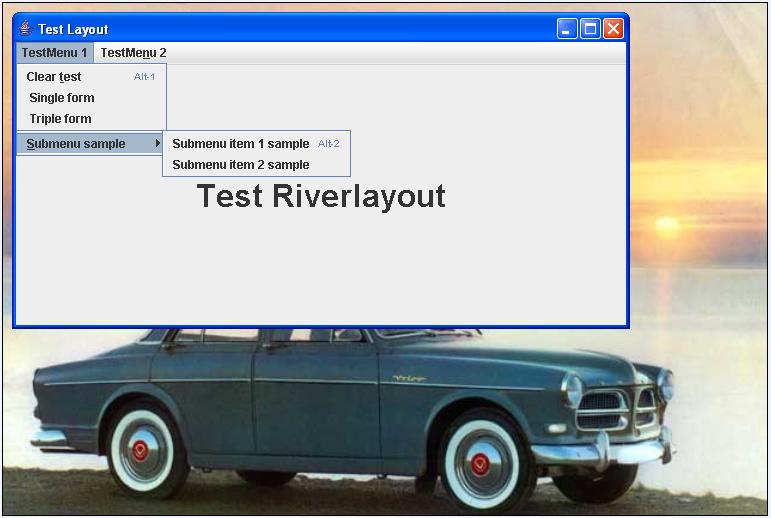
Test Riverlayout :: sample

Test RiverLayout :: (pics dir: see bottom)
Package beans
1.SingleForm.java
2.TripleForm.java
Package forms.masterforms
1.SingleMasterForm.java
2.TripleMasterForm.java
Package se.datadosen
> Download
riverlayout.zip
Package src
1.MenuBar.java
2.OpeningForm.java
Package testen
1.RiverLayoutTest.java

Project pw Helpdesk


Started with new project helpdesk:
-basic layout : see pic
-todo : treeview final configuration
-todo : create searchpanel
-todo : create tabpane » reflecting search
-todo : implement riverlayout as a test.
LookAndFeel


LookAndFeel
To change the lookandfeel for example to "windowslookandfeel" you will have to add
UIManager.setLookAndFeel to your code :: see sample
buildregistration.java [ full example code : see 19-05-2008 ]
package formbuilding;
import javax.swing.JFrame;
import javax.swing.UIManager;
import javax.swing.UnsupportedLookAndFeelException;
import formbeans.Registration;
public class BuildRegistration {
public BuildRegistration(String title) {
JFrame f = new JFrame(title);
try {
UIManager.setLookAndFeel("com.sun.java.swing.plaf.windows.WindowsLookAndFeel");
} catch (ClassNotFoundException e) {
// TODO Auto-generated catch block
e.printStackTrace();
} catch (InstantiationException e) {
// TODO Auto-generated catch block
e.printStackTrace();
} catch (IllegalAccessException e) {
// TODO Auto-generated catch block
e.printStackTrace();
} catch (UnsupportedLookAndFeelException e) {
// TODO Auto-generated catch block
e.printStackTrace();
}
Registration r = new Registration();
f.setLocation(200, 200);
r.formRiverLayout(f);
f.pack();
f.setVisible(true);
}
public static void main(String[] args) {
BuildRegistration br = new BuildRegistration("Registration");
}
}
JGoodies binding - RiverLayout


A working example: JGoodies binding - RiverLayout
1: Registration.java
package formbeans;
import java.awt.Container;
import java.awt.event.ActionEvent;
import java.awt.event.ActionListener;
import java.beans.PropertyChangeListener;
import javax.swing.JButton;
import javax.swing.JFrame;
import javax.swing.JLabel;
import javax.swing.JPanel;
import javax.swing.JScrollPane;
import javax.swing.JSplitPane;
import javax.swing.JTextArea;
import javax.swing.JTextField;
import javax.swing.border.EmptyBorder;
import se.datadosen.component.RiverLayout;
import com.jgoodies.binding.adapter.BasicComponentFactory;
import com.jgoodies.binding.beans.BeanAdapter;
import com.jgoodies.binding.beans.ExtendedPropertyChangeSupport;
import com.jgoodies.binding.value.ValueModel;
import com.jgoodies.forms.factories.Borders;
public class Registration {
String username, age, comment;
private String CMD_OK = "cmd.ok"/* NOI18N */;
private JButton okButton, ok1Button, ok2Button;
private ExtendedPropertyChangeSupport changeSupport = new ExtendedPropertyChangeSupport(
this);
public String getUsername() {
return username;
}
public void setUsername(String username) {
String oldValue = username;
this.username = username;
changeSupport.firePropertyChange("stringValue", oldValue, username);
System.out.println(username);
}
public String getAge() {
return age;
}
public void setAge(String age) {
String oldValue = age;
this.age = age;
changeSupport.firePropertyChange("stringValue", oldValue, age);
System.out.println(age);
}
public String getComment() {
return comment;
}
public void setComment(String comment) {
String oldValue = comment;
this.comment = comment;
changeSupport.firePropertyChange("stringValue", oldValue, comment);
System.out.println(comment);
}
public void addPropertyChangeListener(PropertyChangeListener x) {
changeSupport.addPropertyChangeListener(x);
}
public void removePropertyChangeListener(PropertyChangeListener x) {
changeSupport.removePropertyChangeListener(x);
}
public Container formRiverLayout(JFrame f) {
okButton = new JButton();
okButton.setText("ok");
okButton.setActionCommand(CMD_OK);
okButton.addActionListener(new ActionListener() {
public void actionPerformed(ActionEvent event) {
// windowAction(event);
System.out.println("ACTION : BUTTON OK WAS CLICKED");
System.out.println(okButton.getActionCommand());
}
});
ok1Button = new JButton();
ok1Button.setText("ok 1");
ok1Button.setActionCommand(CMD_OK);
ok1Button.addActionListener(new ActionListener() {
public void actionPerformed(ActionEvent event) {
// windowAction(event);
System.out.println("ACTION : BUTTON 1 OK WAS CLICKED");
System.out.println(ok1Button.getActionCommand());
}
});
ok2Button = new JButton(); // we'll need this soon
ok2Button.setText("ok 2");
ok2Button.setActionCommand(CMD_OK);
ok2Button.addActionListener(new ActionListener() {
public void actionPerformed(ActionEvent event) {
// windowAction(event);
System.out.println("ACTION : BUTTON 2 OK WAS CLICKED");
System.out.println(ok2Button.getActionCommand());
}
});
Registration bean = new Registration();
BeanAdapter adapter = new BeanAdapter(bean, true);
ValueModel nameModel = adapter.getValueModel("username");
ValueModel ageModel = adapter.getValueModel("age");
ValueModel commentModel = adapter.getValueModel("comment");
JTextField userinput = BasicComponentFactory.createTextField(nameModel);
JTextField ageinput = BasicComponentFactory.createTextField(ageModel);
JTextArea commentinput = BasicComponentFactory
.createTextArea(commentModel);
ValueModel nameModel01 = adapter.getValueModel("username");
ValueModel ageModel01 = adapter.getValueModel("age");
ValueModel commentModel01 = adapter.getValueModel("comment");
JTextField userinput01 = BasicComponentFactory
.createTextField(nameModel01);
JTextField ageinput01 = BasicComponentFactory
.createTextField(ageModel01);
JTextArea commentinput01 = BasicComponentFactory
.createTextArea(commentModel01);
ValueModel nameModel02 = adapter.getValueModel("username");
ValueModel ageModel02 = adapter.getValueModel("age");
ValueModel commentModel02 = adapter.getValueModel("comment");
JTextField userinput02 = BasicComponentFactory
.createTextField(nameModel02);
JTextField ageinput02 = BasicComponentFactory
.createTextField(ageModel02);
JTextArea commentinput02 = BasicComponentFactory
.createTextArea(commentModel02);
// Panel 1 = left + center
// left
JPanel left = new JPanel();
left.setLayout(new RiverLayout());
left.add("right", new JLabel("Registration form left"));
left.add("p left", new JLabel("Name"));
left.add("tab hfill", userinput);
left.add("br", new JLabel("Age"));
ageinput.setColumns(5);
left.add("tab", ageinput);
left.add("br vtop", new JLabel("Comment"));
commentinput.setRows(3);
left.add("tab hfill vfill", new JScrollPane(commentinput));
left.add("p right", okButton);
// added to level the content of the 3 panels
left.setBorder(Borders.DIALOG_BORDER);
// center
JPanel center = new JPanel();
center.setLayout(new RiverLayout());
center.add("right", new JLabel("Registration form center"));
center.add("p left", new JLabel("Name-center"));
center.add("tab hfill", userinput01);
center.add("br", new JLabel("Age-center"));
ageinput01.setColumns(2);
center.add("tab", ageinput01);
center.add("br vtop", new JLabel("Comment-center"));
center.add("tab hfill vfill", new JScrollPane(commentinput01));
center.add("p right", ok1Button);
center.add(left);
// added to level the content of the 3 panels
center.setBorder(Borders.DIALOG_BORDER);
JSplitPane splitPane = new JSplitPane(JSplitPane.HORIZONTAL_SPLIT,
left, center);
JPanel panel1 = new JPanel();
panel1.setLayout(new RiverLayout());
splitPane.setBorder(new EmptyBorder(-10, -5, -20, -8));
//splitPane.setDividerLocation(150);
//splitPane.setOneTouchExpandable(true);
splitPane.setDividerSize(3);
panel1.add("hfill vfill", splitPane);
JPanel right = new JPanel();
right.setLayout(new RiverLayout());
right.add("right", new JLabel("Registration form right"));
right.add("p left", new JLabel("Name-right"));
right.add("tab hfill", userinput02);
right.add("br", new JLabel("Age-right"));
ageinput02.setColumns(3);
right.add("tab", ageinput02);
right.add("br vtop", new JLabel("Comment-right"));
right.add("tab hfill vfill", new JScrollPane(commentinput02));
right.add("p right", ok2Button);
// added to level the content of the 3 panels
right.setBorder(new EmptyBorder(6, 0, 6, 0));
JSplitPane splitPane0 = new JSplitPane(JSplitPane.HORIZONTAL_SPLIT,
panel1, right);
splitPane0.setBorder(new EmptyBorder(-4, 0, -10, 0));
splitPane0.setDividerSize(3);
Container c = f.getContentPane();
c.add(splitPane0);
// to add a gray border change the code to :
// c.setBackground(Color.GRAY);
// c.setLayout(new RiverLayout());
// c.add("hfill vfill",splitPane0);
return c;
}
}
2.BuildRegistration.java
package formbuilding;
import javax.swing.JFrame;
import formbeans.Registration;
public class BuildRegistration {
public BuildRegistration(String title) {
JFrame f = new JFrame(title);
Registration r = new Registration();
f.setLocation(200, 200);
r.formRiverLayout(f);
f.pack();
f.setVisible(true);
}
public static void main(String[] args) {
BuildRegistration br = new BuildRegistration("Registration");
}
}
<hr>
<pre><font face="Arial">Tags : RiverLaout , sample , java , example , jgoodies , valuemodel</font></pre><hr>