Naar de inhoud

Ramen

Een kijk op....
akke.beakke.be

Archief

Code sorteer tekst : sort text :: javascript


<!DOCTYPE HTML PUBLIC "-//W3C//DTD HTML 3.2//EN">

<HTML>
<HEAD>
   
    <META HTTP-EQUIV="CONTENT-TYPE" CONTENT="text/html; charset=windows-1252">
    <TITLE></TITLE>
    <META NAME="GENERATOR" CONTENT="OpenOffice.org 3.0  (Win32)">
    <META NAME="AUTHOR" CONTENT="piet willems">
    <META NAME="CREATED" CONTENT="20081112;20170300">
    <META NAME="CHANGED" CONTENT="0;0">
<style>

.schrijfstijl{border: 1px solid #4D636F; font-family:Tahoma; font-size:10pt}
.mini{font-family:Tahoma; font-size:7pt;text-spacing:-1px;line-height:90%}
</style>


    <script language=javascript>


    function splitsource(){
   
        var temp,temptemp;
        var defstring;
        var tempsplit = new Array(); // final array
        var split = new Array();
       
       
        temp = document.sourceform.source.value;
        temp = temp.toLowerCase();
        temp=temp.split("\n");


        for(var i=0;i<temp.length;i++){
            temp[i] = removechars(temp[i]);
             temptemp = temp[i].split(" ");
             // second split on every space in the frase.
            tempsplit = tempsplit.concat(temptemp);
            // add the second split to the final array.
        }
       
        tempsplit.sort();
        tempsplit = RemoveDuplicates(tempsplit);
        //make tempsplit array displayable:

        for(i=0;i<tempsplit.length;i++){
            split = split+tempsplit[i]+"<br>";   
        }
        document.getElementById('result').className = 'schrijfstijl';
        document.getElementById('result').innerHTML = split; //
    }
   
    function removechars(string){
        var chars = new Array(',','\r','\n','\'','<','>','-','(',')','{','}','"','.','?','¿','¡','!',':',';',',');
        // add (or change) here char's to the array if other char's need to be
        // removed.
        for(var c=0;c<chars.length;c++){
            string = string.replace(chars[c]," ");
        }
        return string;
    }
   
    function RemoveDuplicates(arr){

        var result=new Array(); // remove the doubles
        var lastValue="";

        for (var i=0; i<arr.length; i++)
            {
              var curValue=arr[i];
              if (curValue != lastValue)
                  {
                result[result.length] = curValue;
                  }
              lastValue=curValue;
            }
        return result;
        // return this result to the array : tempsplit.
       }
   
    </script>
   
</HEAD>

<BODY TEXT="#000000">
<TABLE >
        <TR>
            <TD WIDTH=522 HEIGHT=18 ALIGN=LEFT bgcolor="#990000"><u><b>
            <font face="Arial" size="2" color="#FFFFFF">Javascript </font></b></u></TD>
        </TR>
        <TR>
            <TD WIDTH=522 HEIGHT=334 ALIGN=LEFT>
            <dl>
                <dt><font face="Arial" size="2">Deze code leest het ingaveveld =
            brontekst , sorteert de brontekst en verwijderd de
            dubplicaatwoorden.</font></dt>
                <dt><font face="Arial" size="2">vb: </font></dt>
                <dt><font face="Arial" size="2">Copier de volgende tekst en plak hem
            onderin het iingaveveld.</font></dt>
                <dt><font face="Arial" size="2">Druk nadien de "Verwerk" -knop.</font></dt>
            </dl>
            <table border="0" cellpadding="5" cellspacing="0" width="400">
                <tr>
                    <td align="left" valign="top" bgcolor="#CED8C5" style="border: 1px solid #4F6949">
                    <textarea rows="8" name="S1" cols="61" id="source" style="border: 1px solid #687D55">Je kan niet voorstellen
hoe de mensen de laatste tijd worden belogen
hoe ze worden bedrogen
hoe ze worden veracht en vernederd,
alleen nog in wat ze opbrengen
is er nog belangstelling.</textarea> </td>
                </tr>
            </table>
            </TD>
        </TR>
        <TR>
            <TD HEIGHT=18 ALIGN=LEFT bgcolor="#990000"><b>
            <font face="Arial" size="2" color="#FFFFFF">Ingaveveld</font></b></TD>
        </TR>
        <TR>
            <TD HEIGHT=154 ALIGN=LEFT>
            <form method="POST" name="sourceform" action="">
                <p><textarea rows="4" name="S1" cols="62" id="source"></textarea></p>
                <input type="button" value="Verwerk" name="B1" onclick="splitsource()">
                <input type="reset" value="reset" name="B2">
            </form>
            <p> </TD>
        </TR>
        <TR>
            <TD HEIGHT=18 ALIGN=LEFT bgcolor="#990000"><b>
            <font face="Arial" size="2" color="#FFFFFF">Resultaat</font></b></TD>
        </TR>
        <TR>
            <TD HEIGHT=40 ALIGN=LEFT id="result"> </TD>
        </TR>
        <TR>
            <TD HEIGHT=21 ALIGN=LEFT> </TD>
        </TR>
</TABLE>

</BODY>

</HTML>

Geschreven door de makers om 00:00 Reageer op dit bericht

Presentationmodel :: buffered model :: RiverLayout


CustomerBean.java Structure

package samples.s01
   
CustomerBean.java
   
PresentationModelBuild.java
   
CustomerPresentationModel.java
   
CustomBeanlaunch.java


----------------------------------------------------------------
CustomerBean.java
-----------------------------------------------------------------

package samples.s01;

*
 * Copyright (c) 2008 willems piet pwProTech  All rights reserved.
 *
 * Redistribution and use in source and binary forms, with or without
 * modification, are permitted provided that the following conditions
 * are met:
 *
 *   - Redistributions of source code must retain the above copyright
 *     notice, this list of conditions and the following disclaimer.
 *
 *   - Redistributions in binary form must reproduce the above copyright
 *     notice, this list of conditions and the following disclaimer in the
 *     documentation and/or other materials provided with the distribution.
 *
 */

import com.jgoodies.binding.beans.Model;

public class CustomerBean extends Model {
    public static final String NAME_PROPERTY = "name";
    public static final String OCCUPATION_PROPERTY = "occupation";
    private String name;
    private String occupation;

    public String getName() {
        return name;
    }

    public void setName(String name) {
        String oldValue = name;
        this.name = name;
        firePropertyChange(NAME_PROPERTY, oldValue, name);
    }

    public String getOccupation() {
        return occupation;
    }

    public void setOccupation(String occupation) {
        String oldValue = occupation;
        this.occupation = occupation;
        firePropertyChange(OCCUPATION_PROPERTY, oldValue, occupation);
    }

}


PresentationModelBuild.java

package samples.s01;

*
 * Copyright (c) 2008 willems piet pwProTech  All rights reserved.
 *
 * Redistribution and use in source and binary forms, with or without
 * modification, are permitted provided that the following conditions
 * are met:
 *
 *   - Redistributions of source code must retain the above copyright
 *     notice, this list of conditions and the following disclaimer.
 *
 *   - Redistributions in binary form must reproduce the above copyright
 *     notice, this list of conditions and the following disclaimer in the
 *     documentation and/or other materials provided with the distribution.
 *
 */

import java.awt.Color;
import java.awt.Dimension;
import java.awt.TextField;

import javax.swing.JButton;
import javax.swing.JCheckBox;
import javax.swing.JFrame;
import javax.swing.JLabel;
import javax.swing.JPanel;
import javax.swing.JTextField;

import se.datadosen.component.RiverLayout;

import com.jgoodies.binding.adapter.BasicComponentFactory;

public class PresentationModelBuild extends JPanel {

    static JTextField nameInput,occupationInput;
    static JButton commitButton;
    static JButton resetButton;
    JButton sendButton;
    static CustomerPresentationModel presentationModel;

    public void createComponents() {

        presentationModel = new CustomerPresentationModel(
                new CustomerBean());

        nameInput = BasicComponentFactory.createTextField(presentationModel
                .getBufferedModel(CustomerBean.NAME_PROPERTY));
        occupationInput = BasicComponentFactory
                .createTextField(presentationModel
                        .getBufferedModel(CustomerBean.OCCUPATION_PROPERTY));

        commitButton = new JButton(presentationModel.getCommitAction());
        resetButton = new JButton(presentationModel.getResetAction());
        sendButton = new JButton(presentationModel.getSendAction());
    }

    public void constructGui() {
        JFrame frame = new JFrame();
        JPanel CustomBeanFrm = new JPanel();
        frame.getContentPane().setLayout(new RiverLayout());
        frame.getContentPane().add(CustomBeanFrm);

        CustomBeanFrmGui(CustomBeanFrm);
        commitButton.setEnabled(false);
        commitButton.setEnabled(false);
        frame.pack();
        frame.setDefaultCloseOperation(JFrame.DISPOSE_ON_CLOSE);
        frame.setVisible(true);
    }

    private void CustomBeanFrmGui(JPanel CustomBeanFrm) {
        createComponents();
        CustomBeanFrm.setLayout(new RiverLayout());
        CustomBeanFrm.add("br left", new JLabel("PresentationModel"));
        CustomBeanFrm.add("br hfill", separator(Color.RED));


        CustomBeanFrm.add("br", new JLabel("Name"));
        CustomBeanFrm.add("tab hfill", nameInput);

        CustomBeanFrm.add("br", new JLabel("Occupation"));
        CustomBeanFrm.add("tab hfill", occupationInput);
        CustomBeanFrm.add("br hfill", separator(Color.GRAY));

       
        CustomBeanFrm.add("p br left", resetButton); // The button ins't really located to the left side
        CustomBeanFrm.add("center", sendButton);
        CustomBeanFrm.add("right", commitButton);
        CustomBeanFrm.add("br hfill", separator(Color.GRAY));

    }

    public static void clearForm() {
        commitButton.setEnabled(false);
        nameInput.setText("");
        occupationInput.setText("");

    }

    private static TextField separator(Color c) {
        TextField separator = new TextField();
        separator.setBackground(c);
        separator.setPreferredSize(new Dimension(20, 2));
        return separator;
    }
}


CustomerPresentationModel.java

package samples.s01;

*
 * Copyright (c) 2008 willems piet pwProTech  All rights reserved.
 *
 * Redistribution and use in source and binary forms, with or without
 * modification, are permitted provided that the following conditions
 * are met:
 *
 *   - Redistributions of source code must retain the above copyright
 *     notice, this list of conditions and the following disclaimer.
 *
 *   - Redistributions in binary form must reproduce the above copyright
 *     notice, this list of conditions and the following disclaimer in the
 *     documentation and/or other materials provided with the distribution.
 *
 */

import java.awt.event.ActionEvent;
import javax.swing.AbstractAction;
import javax.swing.Action;
import com.jgoodies.binding.PresentationModel;

public class CustomerPresentationModel extends PresentationModel {

    private static final long serialVersionUID = 1L;
    CommitAction commitAction;
    ResetAction resetAction;
    SendAction sendAction;
    ClearAction clearAction;
    private final CustomerBean customerBean;

    @SuppressWarnings("unchecked")
    public CustomerPresentationModel(CustomerBean customerBean) {
        super(customerBean);
        this.customerBean = customerBean;
        commitAction = new CommitAction();
        resetAction = new ResetAction();
        sendAction = new SendAction();
        clearAction = new ClearAction();

    }

    public Action getCommitAction() {
        return commitAction;
    }

    public Action getSendAction() {
        return sendAction;
    }

    public Action getResetAction() {
        return resetAction;
    }

    public Action getClearAction() {
        return clearAction;
    }
   
    private class CommitAction extends AbstractAction {
        /**
         *
         */
        private static final long serialVersionUID = 1L;

        public CommitAction() {
            super("Commit");
        }

        public void actionPerformed(ActionEvent e) {

            triggerCommit();
            //getBean();
            displayBufferAndBean("COMMIT action:");
            PresentationModelBuild.clearForm();// disable commitbutton

        }
    }

    private class SendAction extends AbstractAction {

        public SendAction() {
            super("Send");
        }

        public void actionPerformed(final ActionEvent e) {

            // getBean();
            if (PresentationModelBuild.resetButton.isEnabled()) {
                PresentationModelBuild.resetButton.setEnabled(true);
            }

            if (isBuffering()) {
                PresentationModelBuild.commitButton.setEnabled(true);

                displayBufferAndBean("SEND Bufferd :true :: Not yet committed");
            } else {
                PresentationModelBuild.commitButton.setEnabled(false);
                displayBufferAndBean("SEND Bufferd :true :: yet Committed");
                //Bufferd still true so by a reset the bufferd values are still available
            }

        }

    }

    private class ResetAction extends AbstractAction {

        public ResetAction() {
            super("Reset");
        }

        public void actionPerformed(ActionEvent e) {

            // release():
            // Removes the PropertyChangeHandler from the observed bean, if the
            // bean is not null. Also removes all listeners from the bean that
            // have been registered with #addBeanPropertyChangeListener before.
            if (isBuffering()) {
                triggerFlush();
                resetChanged();
                System.out.println("RESET action : If changes : Previous restored");
                PresentationModelBuild.commitButton.setEnabled(false);
            }
        }
    }

    private class ClearAction extends AbstractAction {
        // Not Used

        public ClearAction() {
            super("Clear Form");
        }

        public void actionPerformed(ActionEvent e) {

            PresentationModelBuild.resetButton.setEnabled(false);
            PresentationModelBuild.clearForm();
            System.out.println("clearform");
        }
    }

    private void displayBufferAndBean(String buffering) {
        System.out.println("" + "Result " + buffering + "\n"
                + "-------------------------------------------------\n"
                + "Bufferd values :" + "\n"
                + "Buffered beanvalue name :" + getBufferedValue("name") + "\n"
                + "Buffered beanvalue occupation :"+ getBufferedValue("occupation") + "\n"
                + "" + "\n"
                + "Bean values :" + "\n"
                + "CustomerBean value name :" + customerBean.getName() + "\n"
                + "CustomerBean value occupation :" + customerBean.getOccupation() + "\n"
                + "---------------------------------------------------");
    }
}


CustomBeanlaunch.java
--------------------------------------------------------------------------------------------

package samples.s01;

*
 * Copyright (c) 2008 willems piet pwProTech  All rights reserved.
 *
 * Redistribution and use in source and binary forms, with or without
 * modification, are permitted provided that the following conditions
 * are met:
 *
 *   - Redistributions of source code must retain the above copyright
 *     notice, this list of conditions and the following disclaimer.
 *
 *   - Redistributions in binary form must reproduce the above copyright
 *     notice, this list of conditions and the following disclaimer in the
 *     documentation and/or other materials provided with the distribution.
 *
 */

public class CustomBeanlaunch {

    /**
     * @param args
     */
    public static void main(String[] args) {
        // TODO Auto-generated method stub
        PresentationModelBuild pme = new PresentationModelBuild();
        pme.constructGui();
    }
}


RESULTAAT


Result SEND Bufferd :true :: Not yet committed
-------------------------------------------------
Bufferd values :
Buffered beanvalue name :piet
Buffered beanvalue occupation :job

Bean values :
CustomerBean value name :null
CustomerBean value occupation :null
---------------------------------------------------
RESET action : If changes : Previous restored
Result SEND Bufferd :true :: Not yet committed
-------------------------------------------------
Bufferd values :
Buffered beanvalue name :piet
Buffered beanvalue occupation :job

Bean values :
CustomerBean value name :null
CustomerBean value occupation :null
---------------------------------------------------
Result COMMIT action:
-------------------------------------------------
Bufferd values :
Buffered beanvalue name :piet
Buffered beanvalue occupation :job

Bean values :
CustomerBean value name :piet
CustomerBean value occupation :job
---------------------------------------------------

Tags :: RiverLayout , JGoodies , Valueholder , bindings, formmodel , model , sample, samples, java
Geschreven door de makers om 22:57 Reageer op dit bericht

Make a separator for RiverLayout:


Make a separator for RiverLayout:

JFrame frame = new JFrame();
frame.getContentPane().setLayout(new RiverLayout());
frame.getContentPane().add("br left",new JLabel("PresentationModel"));
frame.getContentPane().add("br hfill",separator(Color.RED));
frame.getContentPane().add("br",comboboxPM);
frame.getContentPane().add("tab hfill",fieldPM);
frame.getContentPane().add("br hfill",separator(Color.GRAY));
frame.getContentPane().add("br left",okButton);
frame.getContentPane().add("right",revertButton);//DO NOT USE "TAB RIGHT"
frame.getContentPane().add("br hfill",separator(Color.GRAY));

...


private static TextField separator(Color c) {
    TextField separator = new TextField();
    separator.setBackground(c);
    separator.setPreferredSize(new Dimension(20,2));
return separator;
}

Geschreven door de makers om 00:00 Reageer op dit bericht

Customize combobox (binding JGoodies):: Riverlayout


Customized comboboxes :: Riverlayout : JGoodies binding , valueholder


package samples;

/*
 * Copyright (c) 2008 - 2008 willems piet pwProTech  All rights reserved.
 *
 * Redistribution and use in source and binary forms, with or without
 * modification, are permitted provided that the following conditions
 * are met:
 *
 *   - Redistributions of source code must retain the above copyright
 *     notice, this list of conditions and the following disclaimer.
 *
 *   - Redistributions in binary form must reproduce the above copyright
 *     notice, this list of conditions and the following disclaimer in the
 *     documentation and/or other materials provided with the distribution.
 *
 *
 * THIS SOFTWARE IS PROVIDED BY THE COPYRIGHT HOLDERS AND CONTRIBUTORS "AS
 * IS" AND ANY EXPRESS OR IMPLIED WARRANTIES, INCLUDING, BUT NOT LIMITED TO,
 * THE IMPLIED WARRANTIES OF MERCHANTABILITY AND FITNESS FOR A PARTICULAR
 * PURPOSE ARE DISCLAIMED.  IN NO EVENT SHALL THE COPYRIGHT OWNER OR
 * CONTRIBUTORS BE LIABLE FOR ANY DIRECT, INDIRECT, INCIDENTAL, SPECIAL,
 * EXEMPLARY, OR CONSEQUENTIAL DAMAGES (INCLUDING, BUT NOT LIMITED TO,
 * PROCUREMENT OF SUBSTITUTE GOODS OR SERVICES; LOSS OF USE, DATA, OR
 * PROFITS; OR BUSINESS INTERRUPTION) HOWEVER CAUSED AND ON ANY THEORY OF
 * LIABILITY, WHETHER IN CONTRACT, STRICT LIABILITY, OR TORT (INCLUDING
 * NEGLIGENCE OR OTHERWISE) ARISING IN ANY WAY OUT OF THE USE OF THIS
 * SOFTWARE, EVEN IF ADVISED OF THE POSSIBILITY OF SUCH DAMAGE.
 */

import java.awt.Color;
import java.awt.Dimension;
import java.awt.Font;
import java.awt.event.ActionEvent;
import java.awt.event.ActionListener;
import java.util.ArrayList;

import javax.swing.JButton;
import javax.swing.JComboBox;
import javax.swing.JFrame;
import javax.swing.JLabel;
import javax.swing.JPanel;
import javax.swing.border.EmptyBorder;

import se.datadosen.component.RiverLayout;

import com.jgoodies.binding.adapter.BasicComponentFactory;
import com.jgoodies.binding.adapter.ComboBoxAdapter;
import com.jgoodies.binding.value.ValueHolder;
import com.jgoodies.binding.value.ValueModel;

public class CustomComboAdapter extends JPanel {
    private String CMD_OK = "cmd.ok"/* NOI18N */;

    private JButton okButton;

    public ComboValueHolder ch, cl; // static

    public CustomComboAdapter() {
        JPanel panel = new JPanel(new RiverLayout());
        panel.setBorder(new EmptyBorder(6, 6, 6, 6));
        riverFormBuilder(panel);
        add(panel);
    }

    private void riverFormBuilder(JPanel panel) {
        ArrayList<String> countries = new ArrayList<String>();
        countries.add("England");
        countries.add("Scotland");
        countries.add("Iereland");
        countries.add("Nedtherlands");
        countries.add("Flanders");

        ArrayList<String> languages = new ArrayList<String>();
        languages.add("Dutch");
        languages.add("English");
        languages.add("Spanish");
        languages.add("German");
        languages.add("Russian");
       
        Dimension d = new Dimension(150, 20);
        Font userfont = new Font("Arial",1,12);
       
        ch = new ComboValueHolder();
        ch.setStartselection("Make selection");
        JComboBox countriesComboBoxes = ch.customComboBox(countries, d,userfont,Color.WHITE);

        cl = new ComboValueHolder();
        cl.setStartselection("Spanish");
        JComboBox combolanguageBox = cl.customComboBox(languages, d,userfont,Color.WHITE);
       
        okButton = new JButton();
        okButton.setText("ok");
        okButton.setActionCommand(CMD_OK);
        okButton.addActionListener(new ActionListener() {
            public void actionPerformed(ActionEvent event) {
                // windowAction(event);
                System.out.println("Combo selection country"
                        + ch.getSelectionHolder().getValue());
                System.out.println("Combo selection language"
                        + cl.getSelectionHolder().getValue());
                System.out.println(okButton.getActionCommand());

            }
        });

        panel.add("p", new JLabel("ComboBox Countries:"));
        panel.add("tab hfill", countriesComboBoxes);
        panel.add("tab tab", new JLabel("Selection:"));
        panel.add("tab tab tab hfill", BasicComponentFactory.createTextField(ch
                .getSelectionHolder()));

        panel.add("p", new JLabel("ComboBox Languages:"));
        panel.add("tab hfill", combolanguageBox);
        panel.add("tab tab", new JLabel("Selection:"));
        panel.add("tab tab tab hfill", BasicComponentFactory.createTextField(cl
                .getSelectionHolder()));
        panel.add("p hfill", okButton);
    }

    public static void main(String[] a) {
        JFrame f = new JFrame("Custom ComboBox");
        f.setDefaultCloseOperation(2);
        f.add(new CustomComboAdapter());
        f.pack();
        f.setVisible(true);
    }

    public class ComboValueHolder {
        String startselection;

        ValueModel selectionHolder;

        public ValueModel ComboHolder() {
            ValueModel selectionHolder = new ValueHolder(this.startselection);
            setSelectionHolder(selectionHolder);
            return selectionHolder;
        }

        public JComboBox customComboBox(ArrayList countries, Dimension d, Font font, Color color) {

            ComboBoxAdapter comboBoxAdapter = new ComboBoxAdapter(countries,ComboHolder());
            JComboBox comboBox = new JComboBox();
            comboBox.setPreferredSize(d);
            comboBox.setFont(font);
            comboBox.setBackground(color);
            comboBox.setModel(comboBoxAdapter);
            return comboBox;
        }

        public String getStartselection() {
            return startselection;
        }

        public void setStartselection(String startselection) {
            this.startselection = startselection;
        }

        public ValueModel getSelectionHolder() {
            return selectionHolder;
        }

        public void setSelectionHolder(ValueModel selectionHolder) {
            this.selectionHolder = selectionHolder;
        }

    }
}


Tags :: RiverLayout , JGoodies , Valueholder , bindings, formmodel , model , sample, samples, java

Geschreven door de makers om 00:00 Reageer op dit bericht

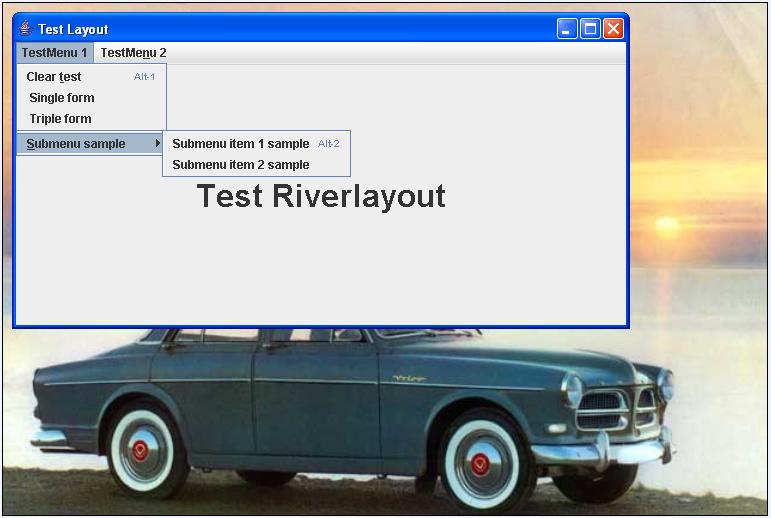
Test Riverlayout :: sample


20648-ab55d0ef396ada1d5da3085958d81d7a.jpg
 

Test RiverLayout :: (pics dir: see bottom)

Package beans
1.SingleForm.java
2.TripleForm.java

Package forms.masterforms
1.SingleMasterForm.java
2.TripleMasterForm.java

Package se.datadosen
> Download riverlayout.zip


Package src
1.MenuBar.java
2.OpeningForm.java


Package testen
1.RiverLayoutTest.java


20648-0fb584ab2cfd18ce2f27bf47df1bf518.jpg
Geschreven door de makers om 00:00 Reageer op dit bericht

Project pw Helpdesk


Started with new project helpdesk:


-basic layout : see pic

-todo :  treeview final configuration
-todo : create searchpanel
-todo : create tabpane » reflecting search
-todo : implement riverlayout as a test.
Geschreven door de makers om 12:44 Reageer op dit bericht

LookAndFeel


LookAndFeel


To change the lookandfeel for example to "windowslookandfeel" you will have to add
UIManager.setLookAndFeel to your code :: see sample

buildregistration.java  [ full example code :  see 19-05-2008 ]

package formbuilding;

import javax.swing.JFrame;
import javax.swing.UIManager;
import javax.swing.UnsupportedLookAndFeelException;

import formbeans.Registration;

public class BuildRegistration {

    public BuildRegistration(String title) {
        JFrame f = new JFrame(title);
        try {
            UIManager.setLookAndFeel("com.sun.java.swing.plaf.windows.WindowsLookAndFeel");
        } catch (ClassNotFoundException e) {
            // TODO Auto-generated catch block
            e.printStackTrace();
        } catch (InstantiationException e) {
            // TODO Auto-generated catch block
            e.printStackTrace();
        } catch (IllegalAccessException e) {
            // TODO Auto-generated catch block
            e.printStackTrace();
        } catch (UnsupportedLookAndFeelException e) {
            // TODO Auto-generated catch block
            e.printStackTrace();
        }
        Registration r = new Registration();
        f.setLocation(200, 200);
        r.formRiverLayout(f);
        f.pack();
        f.setVisible(true);

    }

    public static void main(String[] args) {
        BuildRegistration br = new BuildRegistration("Registration");

    }
}
Geschreven door de makers om 00:00 Reageer op dit bericht

Meer van Ramen

↑ Terug naar de berichten